


Mici - Call & Meet
4.410.00 Reviews
App Specs
- Version
- 1.0.13
- Updated On
- License
- Free
- Downloads
- 1,000,000+
- Developer
- Xiaoyaotu LTD
- Categories
- Social
- Platform
- Android
Screenshots




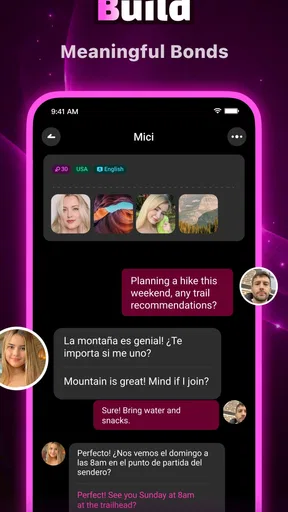
 Analysis by AppCompare
I approached Mici - Call & Meet as a social app for people who want to meet others rather than simply scroll through a passive feed. Its basic promise is easy to understand: make friends, find company, and take part in conversations. In practice, the value depends less on the short store wording and more on whether the experience feels comfortable, readable, and manageable for the way you actually communicate.
My overall impression is that Mici is most interesting for someone who wants a dedicated place for social discovery, especially when ordinary messaging apps feel too tied to existing contacts. It is free to install, although in-app purchases range from $0.99 to $199.99 per item, so I would treat optional spending carefully. The app is aimed at adults, carries a Mature 17+ rating, and comes from Xiaoyaotu LTD.
That adult focus matters. Anyone considering it should think not only about meeting people, but also about boundaries, privacy, pace, and the amount of attention social apps can demand. I found the strongest case for Mici in small, intentional sessions: open it with a clear reason, explore at a comfortable speed, and avoid treating every conversation as an obligation.
How readable and manageable the social experience feels
The first thing I look for in a social app is whether I can understand what to do without having to decode the interface. Mici presents itself as a place to call and meet, so its appeal is more direct than that of a broad social network filled with unrelated posts, brands, and public arguments. That narrower purpose can make the experience easier to approach when your goal is simply to find a conversation.
Still, a focused purpose does not automatically make an app accessible. Social discovery involves several decisions at once: who to notice, whether to respond, when to move from text to a call, and how much personal information to reveal. I recommend taking a slow first pass through the screens rather than immediately accepting every invitation or starting every available interaction. This gives you a chance to learn the rhythm of the app without turning the first session into a test of speed.
For users who prefer clear visual structure, short sessions are useful. I would open Mici when I have enough attention to read profiles and messages properly, not while walking, commuting, or multitasking. Social apps often reward quick reactions, but quick is not always better. A person with dyslexia, reduced concentration, or a need for extra processing time may find it easier to decide on one action at a time: browse, read, reply, then leave.
One practical habit is to separate discovery from conversation. I would first look through the available people and interactions, then return to the conversations that genuinely interest me. This reduces the mental load of trying to evaluate someone while also composing a response. It is a small workflow, but it makes a social app feel less like an endless stream of decisions.
Worth Reading Before You Choose

EA SPORTS FC Mobile 26 Is a Bigger Football Game, but It Takes Time

Flipboard Shows What News Apps Must Do Beyond the Feed

Switching to Android Auto Means Rethinking Your Driving Routine

Google Calendar Makes a Crowded Week Easier to Manage

Ludo King Makes the Most of the Minutes Between Plans

Baby Panda World Brings Quick Play to Modern Phones, but Its Game Library Feels Busy
Mici also suits people who are tired of the social pressure built into larger platforms. On a general network, finding new friends can mean navigating public posts, follower counts, trending material, and established communities. Here, the purpose is more personal. The trade-off is that a dedicated meeting app may feel more intense: every interaction can seem like it has a social purpose, rather than being one small part of a wider feed.
The app currently carries a 4.4 average from around 27 thousand ratings, which suggests that many users find the basic experience worthwhile. I would not treat that figure as a guarantee that the interface will suit everyone. Readability is personal, and the real question is whether the way Mici presents people and conversations matches your own pace and comfort level.
Small habits that make navigation easier
I would keep notifications under control from the beginning. Even without assuming a particular notification system, the general principle is important: a social app should fit around your day, not dictate it. Checking at planned times helps users who are sensitive to interruptions, managing work or study, or simply trying to avoid compulsive checking.
Another useful approach is to write a short personal rule before using the app. For example, I might decide that I will not move to a call until I have had enough text conversation to feel comfortable, or that I will stop for the evening after replying to a few people. This is especially helpful for users who find open-ended social choices tiring.
I would also avoid judging the app solely by how quickly I can reach a conversation. A fast route is not necessarily an inclusive route. Someone using a screen magnifier, alternative input method, voice control, or a slower reading pace may need more time between actions. Giving yourself that time can improve the quality of interactions as well as reduce frustration.
Motor, sensory, and communication considerations
Calling and meeting tools can be appealing to people who find written conversation difficult, but they can also create new barriers. Text gives me time to pause, edit, and choose my words. A call is more immediate and may be harder for someone with a speech difference, hearing loss, auditory processing difficulties, anxiety, or an environment where speaking aloud is not practical.
For that reason, I see Mici as more flexible when used as a gradual communication space rather than a demand to go straight into live conversation. If text interaction is available in the version you use, I would begin there and make the transition to a call only when it feels useful. This is not just a safety preference; it also supports people who communicate better in writing or need time to process spoken information.
Users with motor limitations may want to consider how comfortable they are with repeated tapping, scrolling, typing, and switching between conversation choices. I cannot responsibly promise that every control will work equally well with every assistive setup, so I would test the core actions early: opening a profile, starting a message, returning to the previous screen, and ending an interaction. Those tasks tell you more than a polished first impression.
A helpful technique is to use the phone’s own accessibility tools where they fit your needs. Larger system text, display magnification, voice input, switch access, or an alternative keyboard can make social communication less tiring. These adjustments belong to the device and operating system rather than being a special claim about Mici, but they may change whether the app is comfortable for you.
Sensory comfort is another important part of the decision. Social apps can be demanding because they combine faces, text, alerts, and the emotional intensity of meeting strangers. I would use Mici in a calm setting first, with the screen brightness and sound at levels that do not cause strain. If calls are part of your plan, headphones may help in a noisy place, while text may be the better choice when sound is overwhelming or private speech is impossible.
There is also a communication trade-off that is easy to miss. A call can reveal warmth, timing, and personality more quickly than text, but it can also expose differences in speech, accent, fluency, or response speed before trust has developed. I would not assume that a person who prefers text is less interested. In an inclusive social experience, the method of communication should be part of the conversation, not a pass-or-fail test.
Choosing the right format for the moment
Imagine using Mici during a lunch break in a busy workplace. You may have enough time to read a message but not enough privacy to speak. In that situation, a text-first approach is more realistic than accepting a call. Later, at home, you might have the quiet and concentration needed for a longer conversation. The same person can need different forms of access at different times.
A second example is someone with fluctuating energy. On a good day, a live conversation may feel natural; on a difficult day, composing a short message may be all they can manage. I like the idea of treating social participation as adjustable rather than binary. Mici is more useful when it can fit those changes, but users should still set expectations with new contacts so a slower reply is not mistaken for disinterest.
For people who rely on captions, transcripts, sign language, or other communication support, the practical question is whether a live call gives them enough control. If it does not, I would keep the interaction in a format that preserves clarity and time. No social app is worth forcing yourself into a communication mode that leaves you excluded from the conversation.
Using Mici across different situations
The app’s social focus makes sense for several everyday situations. Someone who has moved to a new city might use it to begin meeting people outside an existing circle. A remote worker could use it as a way to seek conversation beyond work channels. Someone who is shy in large public communities may prefer one-to-one discovery over posting to a crowd.
I would be more cautious about using it when I am lonely and emotionally vulnerable. That is not a criticism of Mici specifically; meeting strangers requires judgment, and loneliness can make quick intimacy feel safer than it really is. I would avoid sharing sensitive details early, keep conversations inside the app until trust develops, and never let enthusiasm from a new contact pressure me into a call or meeting.
The Mature 17+ rating is a clear signal that this is not an app for children. Parents should not treat the age label as a substitute for supervision or conversation about online contact. For adults, it is still worth remembering that an age classification describes the intended audience, not the character of every person you may encounter.
Mici has reached over a million installs, so it is not an obscure experiment with no visible audience. That can be encouraging for someone hoping to find active social possibilities. At the same time, a larger audience can bring more variety in communication styles, intentions, and expectations. I would approach each new contact individually rather than assuming that popularity means compatibility.
Compared with a standard messaging app, Mici is better suited to discovering new people, while a familiar messenger is usually better once I already know whom I want to contact. Compared with a large social network, Mici may feel less cluttered because its purpose is narrower, but it may offer less of the broader community context that helps users understand someone’s interests over time. Compared with a dating-focused service, its friend-making angle can be more comfortable for people who are not looking for romance, although users should still state their intentions clearly.
That comparison leads to a useful decision rule. If you want to maintain existing relationships, choose the tool where your friends already are. If you want public communities built around hobbies, a group-oriented platform may be stronger. If your main aim is to meet people directly and decide whether a conversation develops, Mici is the more relevant experiment.
Practical boundaries for safer, calmer use
I would prepare three boundaries before becoming active. First, decide what personal information stays private at the beginning. Second, decide how you will respond when someone pushes for faster contact than you want. Third, decide when you will end a conversation that becomes uncomfortable. Having those answers ready is valuable for anyone, and particularly for users who find confrontation or rapid social decisions difficult.
If you eventually arrange an in-person meeting, I would keep it public, tell someone I trust where I am going, and preserve an easy way to leave. Mici can help begin a connection, but it cannot replace ordinary judgment about meeting a stranger. The most inclusive approach is also the most practical: make safety steps simple enough that you can follow them even when you are nervous or tired.
Cost deserves attention as well. The app is free, which lowers the barrier to trying it, but optional purchases can become expensive because the listed range extends up to $199.99 for a single item. I would not buy anything during the first session. Instead, I would learn what can be done without spending, decide whether the community actually suits me, and use device-level purchase controls if other people share the phone.
Where access still has limits
The biggest remaining barrier is uncertainty around fit. A social app can be welcoming in tone while still being difficult for someone whose needs fall outside the most common interaction pattern. Users who need highly predictable navigation, extensive text alternatives, precise keyboard control, or carefully supported live communication should test those essentials before investing time or money.
There is also an emotional barrier. Meeting people is not automatically easier simply because the app is designed for it. Profiles and conversations can encourage comparison, rejection, or pressure to respond quickly. For users with anxiety, attention difficulties, or a history of negative online experiences, the app may be best used with a firm time limit and a clear exit plan.
People who need a strong community around a specific identity, language, hobby, or support need may find a specialist service more useful. Mici’s broad social purpose is approachable, but broadness can mean less context. A platform built around a shared interest often gives conversation an immediate starting point, while a general meeting app asks users to create that connection themselves.
I would also skip Mici if my priority is a fully established contact list, professional networking, or family communication. Those jobs are handled more efficiently by tools designed around known relationships. Mici makes the most sense when the uncertainty of meeting someone new is part of the point, not an inconvenience to remove.
Finally, I would not make the purchase range a minor footnote. Free entry is helpful, but social apps can make optional spending feel connected to visibility, access, or momentum. Before paying, I would ask whether the purchase solves a real problem for me or merely encourages more time in the app. That pause is especially important for younger adults and anyone managing a strict budget.
My inclusive verdict after weighing the trade-offs
Mici is a reasonable choice for adults who want a direct route into new social conversations and who are comfortable deciding their own pace. Xiaoyaotu LTD has positioned it in the social category rather than as a general content platform, and that focus gives it a clear identity. The current version is 1.0.13, and it supports devices running Android 5.0 or later, making the technical entry point broad for compatible Android users.
What I like most is the possibility of using it as a gradual bridge: discover someone, exchange a few messages, and only then consider a call or a meeting. That workflow is more inclusive than assuming everyone wants immediate live interaction. It also helps me judge compatibility before giving a stranger more access to my time or attention.
What holds me back is the same thing that makes social discovery exciting: the experience depends heavily on the people you encounter and on your ability to manage boundaries. Users who need guaranteed communication accommodations, a specialist community, or a tightly controlled contact environment may be happier elsewhere. A familiar messenger, an interest-based group, or a platform designed around a particular accessibility need can be the better tool.
My recommendation is to try Mici slowly, keep spending off the table until the free experience proves useful, and treat text and calls as different communication choices rather than interchangeable steps. Use the phone’s accessibility settings where helpful, choose quiet moments for conversations, and give yourself permission to leave interactions that feel rushed or uncomfortable.
Mici is worth considering when you want new connections but still want control over the pace. It is not a universal answer for every social situation, yet it can be a practical option for adults who approach it deliberately. For me, its inclusive potential comes less from making grand promises and more from allowing users to decide how, when, and with whom they participate.
Pros
- Simple interface makes calling and meeting new people easy.
- Supports spontaneous conversations without requiring lengthy profiles.
- Useful for users seeking casual social interaction from their phone.
- Quick matching can reduce the effort needed to find someone to talk with.
- The concept is easy to understand for first-time users.
Cons
- The quality of conversations depends heavily on the people you are matched with.
- Some features may require in-app purchases or paid credits.
- Unexpected calls or interactions may feel uncomfortable for some users.
- Privacy settings should be reviewed carefully before sharing personal details.
- The user base may vary by region
- affecting match availability.
FAQs for Mici - Call & Meet
What is Mici - Call & Meet, and what can I use it for?
Mici - Call & Meet is a social communication app designed for meeting and interacting with other people through calls and online conversations. Depending on the features available in your region and account, you may be able to discover users, start chats, and make voice or video calls. It is mainly intended for casual social interaction rather than replacing professional meeting platforms.
Is Mici - Call & Meet free to download and use?
The app may be free to download, but some communication features, virtual items, premium functions, or extended usage can require in-app purchases. Before spending money, check the pricing shown inside the application and review the subscription details carefully. Availability, costs, and payment options may differ according to your country, device, and the current version of the app.
Do I need to create an account or provide personal information?
You will generally need to create an account or sign in before using the main social and calling features. The app may request information such as a nickname, profile photo, age, gender, phone number, email address, or access to your camera and microphone. Only provide details you are comfortable sharing, and review the privacy policy and permission requests before continuing.
Is Mici - Call & Meet safe for meeting and calling strangers?
As with any app that connects you with unfamiliar people, you should use caution when communicating on Mici - Call & Meet. Avoid sharing your home address, financial information, passwords, private documents, or verification codes. Use the available block and report tools if someone behaves suspiciously, and remember that profiles or conversations may not always represent a person accurately.
What devices and permissions does the app require?
Mici - Call & Meet is intended for compatible Android or iOS devices, although exact operating-system requirements can change with future updates. Voice and video calls normally require microphone and camera access, while notifications may be requested to alert you about messages or calls. Review each permission before granting it, and deny access that is not necessary for the features you plan to use.


